
NVIDIA DLSS 4 is the latest iteration of DLSS introduced with the NVIDIA GeForce RTX 50 Series GPUs. It includes several new features:
- DLSS Multi Frame Generation: Multi Frame Generation has been introduced for GeForce RTX 50 Series GPUs, allowing for generation of up to 3 frames per rendered frame.
- DLSS Ray Reconstruction & DLSS Super Resolution (Beta): Updated to use a new Transformer model, which improves temporal stability, detail in motion, and lighting details.
- DLSS Frame Generation: The Frame Generation model has been updated to run faster and use less VRAM on GeForce RTX 50 and RTX 40 Series GPUs.
Streamline SDK integration overview
The NVIDIA Streamline SDK is an open-source framework that simplifies the integration of NVIDIA DLSS and various super-resolution technologies from other hardware vendors into games and applications. It enables you to implement multiple upscaling solutions through a single integration point within your game engine.
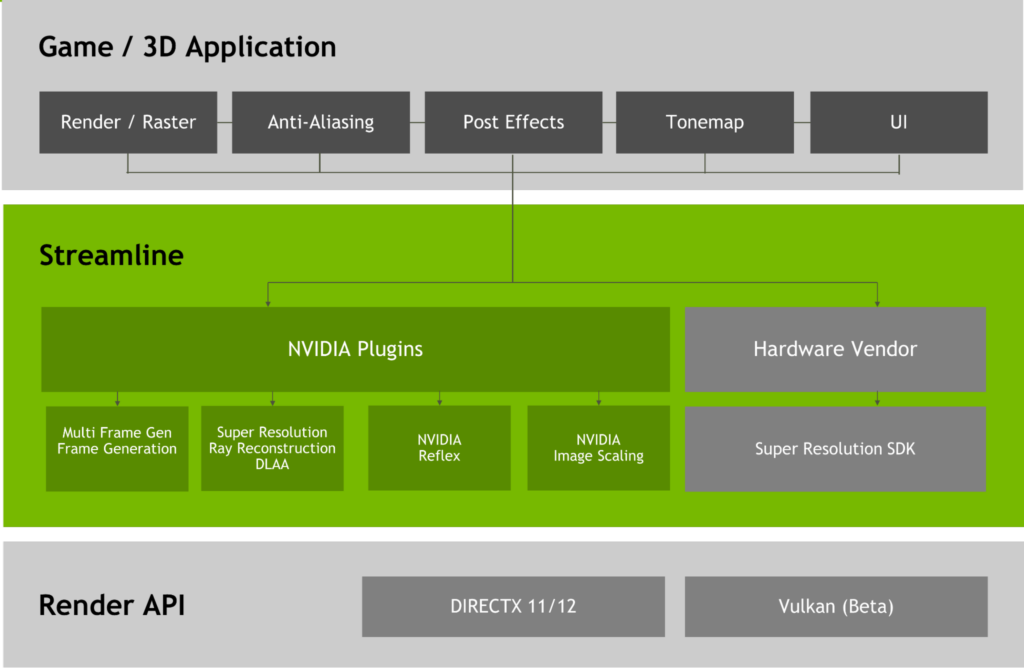
To add Streamline to your application, follow the Streamline Manual Hooking guide. Integrate without any features and focus on tasks such as manual hooking and resource state tracking.
Verify the NVIDIA and Streamline dual signatures on sl.itnerposer.dll before loading the DLL. Follow the verification process within the Security section of the programming guide.
Check for system (hardware and software) support for each of the DLSS 4 features and show appropriate error messages to end users based on reported hardware support.
DLSS Multi Frame Generation integration overview
DLSS Frame Generation is an NVIDIA technology that uses AI to generate additional frames between existing ones in game, significantly boosting frame rates and enabling smoother gameplay on NVIDIA GeForce RTX 50 Series and NVIDIA RTX 40 Series GPUs.
In DLSS 4, NVIDIA introduces Multi-Frame Generation, which enables up to three more frames to be generated per rendered frame on GeForce RTX 50 Series GPUs. For more information, see the DLSS Frame Generation Programming Guide.
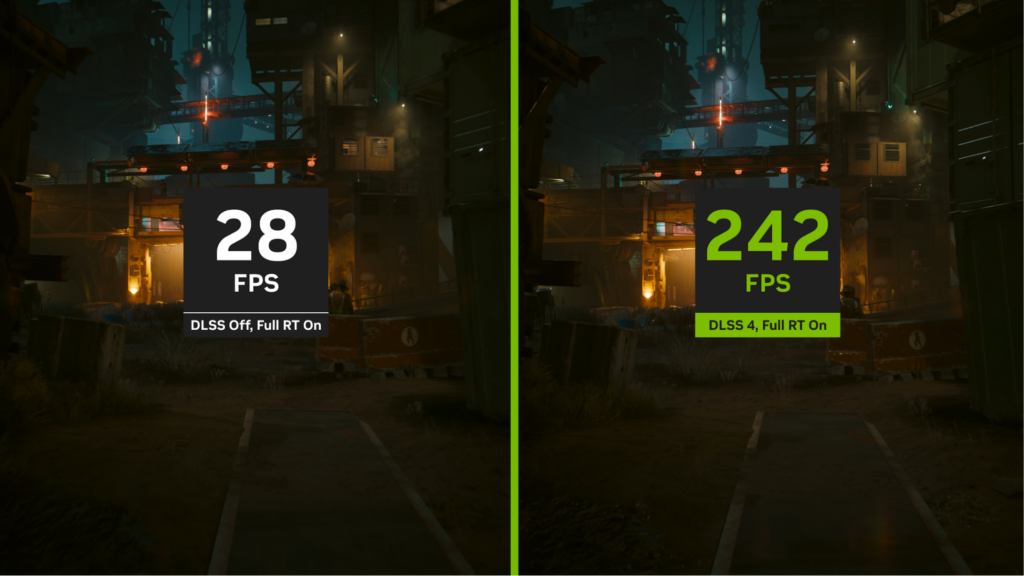
Using Streamline, integrate DLSS Multi Frame Generation. Pass in the appropriate constants, camera matrices, and input resources in addition to the ones marked for DLSS Super Resolution (for example, Hudless and UI Color or Alpha).
Be sure to also disable DLSS Multi Frame Generation when appropriate, such as for in-menu or scene transitions.
Validate that inputs are correct using the Streamline Imgui plugin and buffer visualization using the development DLLs.
DLSS Multi Frame Generation checklist
Here’s the integration checklist:
- All the required inputs are passed to Streamline:
- Depth buffers
- Motion vectors
- HUD-less color buffers
- UI color buffers
- Common constants and a frame index are provided for each frame using the
slSetConstantsandslSetFeatureConstantsmethods. - All tagged buffers are valid at frame present time, and they are not reused for other purposes.
- Buffers are tagged with a unique ID of
0. - The frame index provided with the common constants matches the presented frame.
- For multi-frame generation,
numFramesToGenerateis set 1 less than the multiplier mode. For example: set it to1for 2x,2for 3x, and3for 4x. - Inputs passed into Streamline look correct, as well as camera matrices and dynamic objects.
- The application checks the signature of
sl.interposer.dllto make sure it is a genuine NVIDIA library. - Requirements for Dynamic Resolution are met, if supported by the game.
- DLSS Frame Generation is disabled by setting
sl::DLSSGOptions::modetosl::DLSSGMode::offin the following cases:- When the game is paused
- Loading
- In-menu
- Modifying resolution
- Switching between full-screen and windowed mode
- Not rendering game frames
- The swap chain is re-created every time DLSS Frame Generation is turned on or off by changing
sl::DLSSGOptions::mode. This avoids unnecessary performance overhead when DLSS Frame Generation is switched off. - The amount of motion blur is reduced. When DLSS Frame Generation is enabled, halve the distance and magnitude of motion blur.
- Reflex is properly integrated. For more information, see the checklist in the Reflex Programming Guide.
- The in-game user interface for enabling or disabling DLSS Frame Generation is implemented and follows the NVIDIA RTX UI guidelines.
- Only full production, non-watermarked libraries are packaged in the release build.
- There are no errors or unexpected warnings in the Streamline and DLSS Frame Generation log files while running the feature.
- The extent resolution or resource size, whichever is in use, for the Hudless and UI Color and Alpha buffers exactly matches that of the back buffer.
- The VSync setting in the menu is hooked to
sl::DLSSGState::bIsVsyncSupportAvailable.
DLSS Super Resolution integration overview
DLSS Super Resolution is an NVIDIA technology that uses AI to upscale a lower-resolution image to a higher resolution, boosting game performance. For more information, see the DLSS Programming Guide.

Using Streamline, pass in the necessary input resources and set up the upscaling pipeline before all post-processing. Validate IQ and performance benefits from DLSS Super Resolution.
DLSS Super Resolution checklist
Here’s the integration checklist:
- A game-specific application ID is used during initialization.
- DLSS Super Resolution is integrated as close to the start of post-processing as possible.
- Mip-map bias is set when DLSS Ray Resolution is enabled. Without this, textures will look blurry, smudgy, or low-resolution.
- Motion vectors for all scenes, materials, and objects are accurate.
- Static scenes resolve and compatible jitter is confirmed. Incorrect or missing jitter can lead to poor anti-aliasing and increased flickering.
- Exposure value is properly sent each frame or auto-exposure is enabled.
- DLSS modes are queried and user-selectable in the user interface or dynamic resolution support is active and tested.
- The full production, non-watermarked DLSS library (
nvngx_dlss.dll) is packaged in the release build. - The Camera Reset flag is passed on scene changes, view changes such as first person to third person, or during camera jumps in cutscenes.
- NGX cleanup or shutdown procedures are performed when DLSS is no longer needed. Otherwise, you’ll leak resources/memory.
DLSS should only replace the primary upscale pass on the main render target and should not be used on secondary buffers such as shadows and reflections.
DLSS Ray Reconstruction integration overview
DLSS Ray Reconstruction improves the image quality of path-traced and intensive ray-traced content. It does this by replacing hand-tuned denoisers with an NVIDIA supercomputer-trained AI network that generates higher-quality pixels in between sampled rays.
For more information, see the DLSS Ray Reconstruction Programming Guide.

ALT text: Two versions of a still image from the game Cyberpunk show DLSS off in Overdrive mode and DLSS 3.5 in Overdrive mode with Ray Reconstruction.
DLSS Ray Resolution is an addition to DLSS Super Resolution and uses the same perf quality modes. Make sure that DLSS Super Resolution is integrated first. Then, integrate DLSS Ray Reconstruction using the Streamline SDK. Validate IQ and performance benefits from DLSS Ray Reconstruction.
Ray Reconstruction integration checklist
Here’s the integration checklist:
- A game-specific application ID is used during initialization.
- Both DLSS Ray Reconstruction and DLSS Super Resolution are integrated at the start, or as close to the start as possible, of post-processing.
- Other denoisers in your pipeline, such as NRD, are completely disabled.
DLSSDPresetis set toeDefaultif you previously set it toePresetAorePresetB.- Mip-map bias is set when DLSS Ray Reconstruction is enabled. Without this, textures will look blurry, smudgy, or low-resolution.
- The required buffers are provided.
- DLSS Ray Reconstruction requires linear depth, which is different from those buffers provided to DLSS Super Resolution and DLSS Frame Generation. Use
kBufferTypeLinearDepth, which is specifically provided for this.
- DLSS Ray Reconstruction requires linear depth, which is different from those buffers provided to DLSS Super Resolution and DLSS Frame Generation. Use
- The Inverted Depth bit is set if the depth buffer provided has inverted z ordering.
- Motion vectors and specular motion vectors for all scenes, materials, and objects are accurate.
- Static scenes resolve and compatible jitter is confirmed. Incorrect or missing jitter can lead to poor anti-aliasing and increased flickering.
- DLSS modes are queried and user-selectable in the user interface or dynamic resolution support is active and tested.
- A DLSS RR enable and disable toggle is available.
- The full production, non-watermarked DLSS Ray Reconstruction library (
nvngx_dlssd.dll) is packaged in the release build. - The Camera Reset flag is passed on scene changes, view changes such as first person to third person, or during camera jumps in cutscenes.
- NGX cleanup and shutdown procedures are performed when DLSS is no longer needed. Otherwise, you’ll leak resources and memory.

SAGECONNECT TECHNOLOGY GROUP CO., LIMITED
Sageconnect is a reliable provider of IT network system integration and solutions for global enterprise customers.


